Showing posts with label text. Show all posts
Showing posts with label text. Show all posts
Wednesday, March 4, 2015
How to Place a Pattern Over Text in PowerPoint!
I have to say, when I realized how easy it was to put a pattern over text right in PowerPoint I was floored! I had been doing it in Photoshop forever and its much more time consuming!

More than half of the votes were for how to give text a pattern/texture!

If youre looking for some textures to put over your text, scroll to the end of the document to grab three free textures!


Now, for your three free textures!
.jpg)
.jpg)
.jpg)
To save the files, just click the image to get to the higher quality picture, then right click (or Mac: Ctrl + Click) to save the image onto your computer!
As for next weeks tutorial, Ill be adding a Smart Notebook option... how to "Erase to Reveal" an answer.
More than half of the votes were for how to give text a pattern/texture!
If youre looking for some textures to put over your text, scroll to the end of the document to grab three free textures!
You can download this tutorial as a PDF by clicking this picture!
Note: This tutorial is hosted on Google Docs. To save it from there, just open the file and click File > Download to save onto your computer!
Now, for your three free textures!
To save the files, just click the image to get to the higher quality picture, then right click (or Mac: Ctrl + Click) to save the image onto your computer!
As for next weeks tutorial, Ill be adding a Smart Notebook option... how to "Erase to Reveal" an answer.


Friday, January 30, 2015
Creating a Flex AIR text editor Part 52
In this tutorial we will add an Add snippet feature.
According to our plan weve made earlier, when the user adds a new snippet, a new element must be added to the XML and Table 1. We only work in the SnippetWindow.mxml file in this tutorial.
Before we start coding the mechanics, lets redesign a bit. The only thing were going to change is add a ComboBox component next to the snippet name text input, and combo boxes need an array to have as a data provider. Declare the array first:
Now change the text input tags line to this:
The categoryCombo component will require a function to keep it updated with the correct categories.
Create a function called updateCategoryCombo, which adds 1 "No category" item with index value -1 and each category item from the xml with respective index value.
For now, we only need to call this function in the setValues() function. Also, notice how treeData now equals xmlData and not xmlData.copy(). This time we can and need everything to be real time:
Well, now lets add content to the empty addSnippet function. First add a conditional which checks if both of the input fields are not empty. If any of them is empty, then dispatch a window saying that the user needs to fill out the blanks.
Inside the conditional, create a new SQLStatement object and insert a new snippets row. Use parameters of the statement to set its values, notice how snippetPosition is set to a function called totalItemsIn(categoryCombo.selectedItem.ind):
The totalItemsIn function returns the number of children in a category by specifying an index in the parameter. If the index is -1, then it is the root we have selected:
You can see that when we execute our statement, we call a responder function called addSnippetXML. This is where we add the item to the XML. Remember that we only need to specify some of the values here - the id, label, categoryID and snippetPosition are enough. We dont want to store the text value itself in the XML.
And the code works. Try it, if you want. You will see that items can be added to any specified directory. Note, however, that they also save, but dont display on start up because we are overwriting the database data with our placeholder temporary arrays of data in the main mxml file. If you want to see how it will work with the database, then comment or remove the lines responsible for overwriting categoryData and snippetData in the main mxml file.
Heres the full code for SnippetWindow.mxml:
Thanks for reading!
According to our plan weve made earlier, when the user adds a new snippet, a new element must be added to the XML and Table 1. We only work in the SnippetWindow.mxml file in this tutorial.
Before we start coding the mechanics, lets redesign a bit. The only thing were going to change is add a ComboBox component next to the snippet name text input, and combo boxes need an array to have as a data provider. Declare the array first:
[Bindable]
private var categories:Array = [];
Now change the text input tags line to this:
<s:HGroup>
<s:TextInput id="newNameInput" text="New snippet name" width="240" />
<mx:ComboBox id="categoryCombo" width="240" dataProvider="{categories}" />
</s:HGroup>
The categoryCombo component will require a function to keep it updated with the correct categories.
Create a function called updateCategoryCombo, which adds 1 "No category" item with index value -1 and each category item from the xml with respective index value.
private function updateCategoryCombo():void{
categories = [];
categories.push( { label:"No category", ind: -1 } );
for each (var cat:XML in treeData.category) {
categories.push({label:cat.@label, ind:cat.@id});
}
categoryCombo.selectedIndex = 0;
}
For now, we only need to call this function in the setValues() function. Also, notice how treeData now equals xmlData and not xmlData.copy(). This time we can and need everything to be real time:
public function setValues(xmlData:XMLList, conn1:SQLConnection, conn2:SQLConnection, createNewOnStart:Boolean = false, newText:String = ""):void {
snippetConnection = conn1;
categoryConnection = conn2;
treeData = xmlData;
newTextInput.text = newText;
newNameInput.text = "New snippet name here";
if (newText=="") {
newTextInput.text = "New snippet text here";
}
updateCategoryCombo();
}
Well, now lets add content to the empty addSnippet function. First add a conditional which checks if both of the input fields are not empty. If any of them is empty, then dispatch a window saying that the user needs to fill out the blanks.
Inside the conditional, create a new SQLStatement object and insert a new snippets row. Use parameters of the statement to set its values, notice how snippetPosition is set to a function called totalItemsIn(categoryCombo.selectedItem.ind):
private function addSnippet(name:String, text:String):void{
if (name != "" && text != "") {
var stat:SQLStatement = new SQLStatement();
stat.sqlConnection = snippetConnection;
stat.text = "INSERT INTO snippets (snippetName, snippetText, categoryID, snippetPosition) VALUES (@snippetName, @snippetText, @categoryID, @snippetPosition);"
stat.parameters["@snippetName"] = name;
stat.parameters["@snippetText"] = text;
stat.parameters["@categoryID"] = categoryCombo.selectedItem.ind;
stat.parameters["@snippetPosition"] = totalItemsIn(categoryCombo.selectedItem.ind);
stat.execute(-1, new Responder(addSnippetXML));
}else {
Alert.show("The name and text of the snippet must not be blank!","Oops!");
}
}
The totalItemsIn function returns the number of children in a category by specifying an index in the parameter. If the index is -1, then it is the root we have selected:
private function totalItemsIn(id:int):int {
var toRet:int;
if(id>=0){
toRet = treeData.category.(@id == id).children().length();
}
if (id == -1) {
toRet = treeData.snippet.length();
}
return toRet;
}
You can see that when we execute our statement, we call a responder function called addSnippetXML. This is where we add the item to the XML. Remember that we only need to specify some of the values here - the id, label, categoryID and snippetPosition are enough. We dont want to store the text value itself in the XML.
private function addSnippetXML(evt:SQLResult):void {
var aSnippet:XML = <snippet/>;
aSnippet.@id = evt.lastInsertRowID;
aSnippet.@label = newNameInput.text;
aSnippet.@categoryID = categoryCombo.selectedItem.ind;
aSnippet.@snippetPosition = totalItemsIn(categoryCombo.selectedItem.ind);
aSnippet.@isBranch = false;
if(aSnippet.@categoryID!=-1){
treeData.category.(@id == categoryCombo.selectedItem.ind).appendChild(aSnippet);
}else {
treeData[0].appendChild(aSnippet);
}
}
And the code works. Try it, if you want. You will see that items can be added to any specified directory. Note, however, that they also save, but dont display on start up because we are overwriting the database data with our placeholder temporary arrays of data in the main mxml file. If you want to see how it will work with the database, then comment or remove the lines responsible for overwriting categoryData and snippetData in the main mxml file.
Heres the full code for SnippetWindow.mxml:
<?xml version="1.0" encoding="utf-8"?>
<mx:Window xmlns:fx="http://ns.adobe.com/mxml/2009"
xmlns:s="library://ns.adobe.com/flex/spark"
xmlns:mx="library://ns.adobe.com/flex/mx"
title="Snippet management" type="utility" width="500" height="730"
creationComplete="init();" showStatusBar="false" alwaysInFront="true" resizable="false" backgroundColor="#dddddd">

<fx:Script>
<![CDATA[
import flash.data.SQLConnection;
import flash.data.SQLResult;
import flash.data.SQLStatement;
import flash.events.Event;
import flash.net.Responder;
import mx.controls.Alert;

[Bindable]
public var treeData:XMLList;
private var snippetConnection:SQLConnection;
private var categoryConnection:SQLConnection;
[Bindable]
private var categories:Array = [];

private function init():void{
this.addEventListener(Event.CLOSING, onClose);
}

private function onClose(evt:Event):void {
this.visible = false;
evt.preventDefault();
}

public function setValues(xmlData:XMLList, conn1:SQLConnection, conn2:SQLConnection, createNewOnStart:Boolean = false, newText:String = ""):void {
snippetConnection = conn1;
categoryConnection = conn2;
treeData = xmlData;
newTextInput.text = newText;
newNameInput.text = "New snippet name here";
if (newText=="") {
newTextInput.text = "New snippet text here";
}
updateCategoryCombo();
}

private function addSnippet(name:String, text:String):void{
if (name != "" && text != "") {
var stat:SQLStatement = new SQLStatement();
stat.sqlConnection = snippetConnection;
stat.text = "INSERT INTO snippets (snippetName, snippetText, categoryID, snippetPosition) VALUES (@snippetName, @snippetText, @categoryID, @snippetPosition);"
stat.parameters["@snippetName"] = name;
stat.parameters["@snippetText"] = text;
stat.parameters["@categoryID"] = categoryCombo.selectedItem.ind;
stat.parameters["@snippetPosition"] = totalItemsIn(categoryCombo.selectedItem.ind);
stat.execute(-1, new Responder(addSnippetXML));
}else {
Alert.show("The name and text of the snippet must not be blank!","Oops!");
}
}

private function addSnippetXML(evt:SQLResult):void {
var aSnippet:XML = <snippet/>;
aSnippet.@id = evt.lastInsertRowID;
aSnippet.@label = newNameInput.text;
aSnippet.@categoryID = categoryCombo.selectedItem.ind;
aSnippet.@snippetPosition = totalItemsIn(categoryCombo.selectedItem.ind);
aSnippet.@isBranch = false;
if(aSnippet.@categoryID!=-1){
treeData.category.(@id == categoryCombo.selectedItem.ind).appendChild(aSnippet);
}else {
treeData[0].appendChild(aSnippet);
}
}

private function addCategory(name:String):void{
}

private function updateCategoryCombo():void{
categories = [];
categories.push( { label:"No category", ind: -1 } );
for each (var cat:XML in treeData.category) {
categories.push({label:cat.@label, ind:cat.@id});
}
categoryCombo.selectedIndex = 0;
}

private function totalItemsIn(id:int):int {
var toRet:int;
if(id>=0){
toRet = treeData.category.(@id == id).children().length();
}
if (id == -1) {
toRet = treeData.snippet.length();
}
return toRet;
}
]]>
</fx:Script>

<s:VGroup paddingLeft="5" paddingRight="5" paddingTop="5" paddingBottom="5">
<s:Label text="Snippet creation and management: " />
<s:HGroup>
<s:TextInput id="newNameInput" text="New snippet name" width="240" />
<mx:ComboBox id="categoryCombo" width="240" dataProvider="{categories}" />
</s:HGroup>
<s:TextArea id="newTextInput" width="490" height="200" text="Snippet text" />
<s:HGroup>
<s:Button label="Add snippet" click="addSnippet(newNameInput.text, newTextInput.text);" />
<s:Button label="Save changes" enabled="false" />
<s:Button label="Delete snippet"  enabled="false" />
</s:HGroup>

<s:Label text="" />

<s:Label text="Category creation and management: " />
<s:TextInput id="newCategoryInput" text="New category name" width="490" />
<s:HGroup>
<s:Button label="Add category" click="addCategory(newCategoryInput.text);"/>
<s:Button label="Save changes" enabled="false"/>
<s:Button label="Delete category with its contents" enabled="false"/>
</s:HGroup>

<s:Label text="" />

<mx:Tree id="snippetManageTree" dataProvider="{treeData}" width="490" height="300" showRoot="false" labelField="@label"/>
</s:VGroup>

</mx:Window>
Thanks for reading!
Saturday, January 24, 2015
Creating a Flex AIR text editor Part 22
In this tutorial we will reposition the sidePane and tabBar a little, as well as add a close button for the side pane.
This is how the application is going to look like by the end of this tutorial:
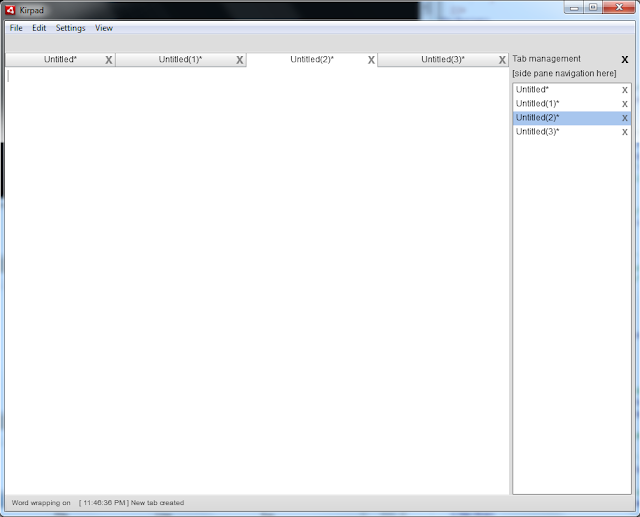
The width of the tab bar is now going to be the same as the width of the text area. When side pane is enabled, it is narrowed, when side pane is disabled - the text area is 100% wide. Same now goes to the tab bar, so lets set the width of the tabbar to textWidth:
We need to update the updateTextSize() function to reposition the side pane (move it higher):
Now lets create a close button for the side pane. It can be used to close the side pane (set the pref_sidepane variable to false). To reenable it after that, the user will have to do it using the native menu.
Find the label that says "Tab management", create a group and put this label in it. Add another label there, stylize it to look like an X button and call a closeSidePane() function on click:
The closeSidePane() function closes the side pane by toggling pref_sideplane, calling the savePreferences() and updateTextSize() functions.
Heres the full code:
Thanks for reading!
This is how the application is going to look like by the end of this tutorial:
The width of the tab bar is now going to be the same as the width of the text area. When side pane is enabled, it is narrowed, when side pane is disabled - the text area is 100% wide. Same now goes to the tab bar, so lets set the width of the tabbar to textWidth:
<custom:CustomTabBar id="tabBar" dataProvider="{tabData}" width="{textWidth}" y="{tabY}" itemRenderer="CustomTab" height="22" tabClose="onTabClose(event);" change="tabChange(tabbar);" selectedIndex="{tabSelectedIndex}" />
We need to update the updateTextSize() function to reposition the side pane (move it higher):
private function updateTextSize():void {
tabY = (toolBar.visible)?(toolBar.height):(0);
textY = tabBar.height + tabY;
var statusHeight:Number = (pref_status)?(statusBar.height):(0);
textHeight = height - textY - statusHeight;
textWidth = (pref_sidepane)?(width - sidePaneWidth):(width);
focusManager.setFocus(textArea);
sidePaneHeight = textHeight + tabBar.height;
sidePaneY = textY-tabBar.height;
sidePaneX = width - sidePaneWidth;
}
Now lets create a close button for the side pane. It can be used to close the side pane (set the pref_sidepane variable to false). To reenable it after that, the user will have to do it using the native menu.
Find the label that says "Tab management", create a group and put this label in it. Add another label there, stylize it to look like an X button and call a closeSidePane() function on click:
<mx:Box id="sidePane" width="{sidePaneWidth}" y="{sidePaneY}" x="{sidePaneX}" height="{sidePaneHeight}" backgroundColor="#dddddd" visible="{pref_sidepane}" paddingTop="5" paddingLeft="5" horizontalScrollPolicy="off">
<s:Group>
<s:Label text="Tab management" width="{sidePaneWidth}" />
<s:Label text="x" width="20" fontSize="18" fontWeight="bold" y="-2" x="{sidePaneWidth-25}" color="#333333" buttonMode="true" click="closeSidePane();" />
</s:Group>
<s:Label text="[side pane navigation here]" width="100%" />
<custom:CustomList id="sideList" dataProvider="{tabData}" width="{sideContentWidth}" height="100%" itemRenderer="CustomListItem" selectedIndex="{tabSelectedIndex}" change="tabChange(sidelist);" tabClose="onListClose(event);"/>
</mx:Box>
The closeSidePane() function closes the side pane by toggling pref_sideplane, calling the savePreferences() and updateTextSize() functions.
private function closeSidePane():void{
pref_sidepane = !pref_sidepane
savePreferences();
updateTextSize();
}
Heres the full code:
<?xml version="1.0" encoding="utf-8"?>
<s:WindowedApplication xmlns:fx="http://ns.adobe.com/mxml/2009"
                       xmlns:s="library://ns.adobe.com/flex/spark"
                       xmlns:mx="library://ns.adobe.com/flex/mx"
   xmlns:custom="*"
   creationComplete="init();" title="Kirpad" showStatusBar="{pref_status}"
   minWidth="400" minHeight="200" height="700" width="900">

<s:menu>
<mx:FlexNativeMenu dataProvider="{windowMenu}" showRoot="false" labelField="@label" keyEquivalentField="@key" itemClick="menuSelect(event);" />
</s:menu>

<fx:Script>
<![CDATA[
import flash.events.KeyboardEvent;
import flash.events.Event;
import flash.events.MouseEvent;
import flash.events.NativeWindowBoundsEvent;
import flash.net.SharedObject;
import mx.collections.ArrayCollection;
import mx.controls.Alert;
import mx.events.FlexNativeMenuEvent;
import flashx.textLayout.elements.TextFlow;
import flashx.textLayout.elements.Configuration;
import flash.system.System;
import flash.desktop.Clipboard;
import flash.desktop.ClipboardFormats;
import flash.ui.Mouse;
import mx.events.CloseEvent;
import flash.ui.ContextMenu;
import flash.ui.ContextMenuItem;
import flash.events.ContextMenuEvent;
import mx.events.ResizeEvent;
import mx.core.FlexGlobals;

private var preferences:SharedObject = SharedObject.getLocal("kirpadPreferences");
[Bindable]
private var pref_wrap:Boolean = true;
[Bindable]
private var pref_status:Boolean = true;
[Bindable]
private var pref_toolbar:Boolean = true;
[Bindable]
private var pref_sidepane:Boolean = true;
[Bindable]
public var pref_fontsettings:Object = new Object();

private var initHeight:Number;
private var heightFixed:Boolean = false;

private var statusMessage:String;
[Bindable]
private var textHeight:Number;
[Bindable]
private var textWidth:Number;
[Bindable]
private var textY:Number;
[Bindable]
private var tabY:Number;
[Bindable]
private var sidePaneY:Number;
[Bindable]
private var sidePaneX:Number;
[Bindable]
private var sidePaneHeight:Number;
[Bindable]
private var sidePaneWidth:Number = 180;
[Bindable]
private var sideContentWidth:Number = 170;

[Bindable]
private var tabSelectedIndex:int = 0;

private var previousIndex:int = 0;
private var rightclickTabIndex:int = 0;
private var untitledNum:int = 0;
private var tabsToClose:int = 0;
private var closeAfterConfirm:Boolean = false;

public var fontWindow:FontWindow = new FontWindow();

private function init():void {

// Create a listener for every frame
addEventListener(Event.ENTER_FRAME, everyFrame);

// Set initHeight to the initial height value on start
initHeight = height;

// Set preferences if loaded for the first time
if (preferences.data.firsttime == null) {
preferences.data.firsttime = true;
preferences.data.wrap = true;
preferences.data.status = true;
preferences.data.toolbar = true;
preferences.data.sidepane = true;
preferences.data.fontsettings = {fontfamily:"Lucida Console", fontsize:14, fontstyle:"normal", fontweight:"normal", fontcolor:0x000000, bgcolor:0xffffff};
preferences.flush();
}

// Set preferences loaded from local storage
pref_wrap = preferences.data.wrap;
pref_status = preferences.data.status;
pref_toolbar = preferences.data.toolbar;
pref_sidepane = preferences.data.sidepane;
pref_fontsettings = preferences.data.fontsettings;

// Allow insertion of tabs
var textFlow:TextFlow = textArea.textFlow;
var config:Configuration = Configuration(textFlow.configuration);
config.manageTabKey = true;

// Set status message
statusMessage = "[ " + new Date().toLocaleTimeString() + " ] Kirpad initialized";
updateStatus();

// Close all sub-windows if main window is closed
addEventListener(Event.CLOSING, onClose);

// Add listener for the event that is dispatched when new font settings are applied
fontWindow.addEventListener(Event.CHANGE, fontChange);

// Update real fonts with the data from the settings values
updateFonts();

// Create a listener for resizing
addEventListener(NativeWindowBoundsEvent.RESIZE, onResize);

// Context menu declaration for the tabbar control
var cm_close:ContextMenuItem = new ContextMenuItem("Close tab");
cm_close.addEventListener(ContextMenuEvent.MENU_ITEM_SELECT, tabContextClose);
var cm_closeother:ContextMenuItem = new ContextMenuItem("Close other tabs");
cm_closeother.addEventListener(ContextMenuEvent.MENU_ITEM_SELECT, tabContextCloseOther);

var cm:ContextMenu = new ContextMenu();
cm.items = [cm_close, cm_closeother];
cm.hideBuiltInItems();
tabBar.contextMenu = cm;
tabBar.addEventListener(MouseEvent.RIGHT_MOUSE_DOWN, tabRightClick);

// Listen to keyboard
addEventListener(KeyboardEvent.KEY_DOWN, onKeyDown);
}

private function menuSelect(evt:FlexNativeMenuEvent):void {
(evt.item.@label == "New")?(doNew()):(void);
(evt.item.@label == "Word wrap")?(pref_wrap = !pref_wrap):(void);
(evt.item.@label == "Cut")?(doCut()):(void);
(evt.item.@label == "Copy")?(doCopy()):(void);
(evt.item.@label == "Paste")?(doPaste()):(void);
(evt.item.@label == "Select all")?(doSelectall()):(void);
(evt.item.@label == "Status bar")?(pref_status = !pref_status):(void);
(evt.item.@label == "Tool bar")?(pref_toolbar = !pref_toolbar):(void);
(evt.item.@label == "Side pane")?(pref_sidepane = !pref_sidepane):(void);
(evt.item.@label == "Font...")?(doFont()):(void);
savePreferences();
updateStatus();
updateTextSize();
}

private function savePreferences():void {
preferences.data.wrap = pref_wrap;
preferences.data.status = pref_status;
preferences.data.toolbar = pref_toolbar;
preferences.data.fontsettings = pref_fontsettings;
preferences.data.sidepane = pref_sidepane;
preferences.flush();
}

private function doCut():void {
var selectedText:String = textArea.text.substring(textArea.selectionActivePosition, textArea.selectionAnchorPosition);
System.setClipboard(selectedText);
insertText("");
}

private function doCopy():void {
var selectedText:String = textArea.text.substring(textArea.selectionActivePosition, textArea.selectionAnchorPosition);
System.setClipboard(selectedText);
}

private function doPaste():void{
var myClip:Clipboard = Clipboard.generalClipboard;
var pastedText:String = myClip.getData(ClipboardFormats.TEXT_FORMAT) as String;
insertText(pastedText);
}

private function doSelectall():void {
textArea.selectAll();
}

private function insertText(str:String):void {
var substrPositions:int = textArea.selectionActivePosition - textArea.selectionAnchorPosition;
var oldSel1:int = (substrPositions>0)?(textArea.selectionAnchorPosition):(textArea.selectionActivePosition);
var oldSel2:int = (substrPositions<0)?(textArea.selectionAnchorPosition):(textArea.selectionActivePosition);
var preText:String = textArea.text.substring(0, oldSel1);
var postText:String = textArea.text.substring(oldSel2);
var newSelectRange:int = preText.length + str.length;
textArea.text = preText + str + postText;
textArea.selectRange(newSelectRange, newSelectRange);
}

private function cursorFix():void{
Mouse.cursor = "ibeam";
}

private function everyFrame(evt:Event):void {
if (!heightFixed && height==initHeight) {
height = initHeight - 20;
if (height != initHeight) {
heightFixed = true;
updateTextSize();
}
}
}

private function onResize(evt:ResizeEvent):void {
updateTextSize();
}

private function updateTextSize():void {
tabY = (toolBar.visible)?(toolBar.height):(0);
textY = tabBar.height + tabY;
var statusHeight:Number = (pref_status)?(statusBar.height):(0);
textHeight = height - textY - statusHeight;
textWidth = (pref_sidepane)?(width - sidePaneWidth):(width);
focusManager.setFocus(textArea);
sidePaneHeight = textHeight + tabBar.height;
sidePaneY = textY-tabBar.height;
sidePaneX = width - sidePaneWidth;
}

private function updateStatus():void {
var str:String = new String();
str = (pref_wrap)?("Word wrapping on"):(caretPosition());
status = str + "	" + statusMessage;
}

private function caretPosition():String {
var pos:int = textArea.selectionActivePosition;
var str:String = textArea.text.substring(0, pos);
var lines:Array = str.split("
");
var line:int = lines.length;
var col:int = lines[lines.length - 1].length + 1;

return "Ln " + line + ", Col " + col;
}

private function doFont():void{
fontWindow.open();
fontWindow.activate();
fontWindow.visible = true;
fontWindow.setValues(pref_fontsettings.fontsize, pref_fontsettings.fontfamily, pref_fontsettings.fontstyle, pref_fontsettings.fontweight, pref_fontsettings.fontcolor, pref_fontsettings.bgcolor);
}

private function onClose(evt:Event):void {
if(!closeAfterConfirm){
evt.preventDefault();
var allWindows:Array = NativeApplication.nativeApplication.openedWindows;
for (var i:int = 1; i < allWindows.length; i++)
{
allWindows[i].close();
}

// Check if there are any unsaved tabs
var needSaving:Boolean = false;
tabsToClose = 0;

for (var u:int = 0; u < tabData.length; u++) {
if (tabData[u].saved == false) {
needSaving = true;
tabsToClose++;
}
}

// If there are unsaved tabs, dont close window yet, set closeAfterConfirm to true and close all tabs
if (needSaving) {
closeAfterConfirm = true;
for (var t:int = 0; t < tabData.length; t++) {
closeTab(t);
}
}
if (!needSaving) {
FlexGlobals.topLevelApplication.close();
}
}
}

private function fontChange(evt:Event):void{
pref_fontsettings.fontfamily = fontWindow.fontCombo.selectedItem.fontName;
pref_fontsettings.fontsize = fontWindow.sizeStepper.value;

if (fontWindow.styleCombo.selectedIndex == 0) {
pref_fontsettings.fontstyle = "normal";
pref_fontsettings.fontweight = "normal";
}
if (fontWindow.styleCombo.selectedIndex == 1) {
pref_fontsettings.fontstyle = "italic";
pref_fontsettings.fontweight = "normal";
}
if (fontWindow.styleCombo.selectedIndex == 2) {
pref_fontsettings.fontstyle = "normal";
pref_fontsettings.fontweight = "bold";
}
if (fontWindow.styleCombo.selectedIndex == 3) {
pref_fontsettings.fontstyle = "italic";
pref_fontsettings.fontweight = "bold";
}

pref_fontsettings.fontcolor = fontWindow.colorPicker.selectedColor;
pref_fontsettings.bgcolor = fontWindow.bgColorPicker.selectedColor;

savePreferences();
updateFonts();
}

private function updateFonts():void{
textArea.setStyle("fontFamily", pref_fontsettings.fontfamily);
textArea.setStyle("fontSize", pref_fontsettings.fontsize);
textArea.setStyle("fontStyle", pref_fontsettings.fontstyle);
textArea.setStyle("fontWeight", pref_fontsettings.fontweight);
textArea.setStyle("color", pref_fontsettings.fontcolor);
textArea.setStyle("contentBackgroundColor", pref_fontsettings.bgcolor);
}

private function onTabClose(evt:Event):void {
var tabWidth:Number = tabBar.width / tabData.length;
var cIndex:int = Math.floor(tabBar.mouseX / tabWidth);
tabSelectedIndex = cIndex;
tabChange();
closeTab(tabSelectedIndex);
}

private function onListClose(evt:Event):void {
tabSelectedIndex = sideList.selectedIndex;
tabChange();
closeTab(tabSelectedIndex);
}

private function closeTab(index:int):void {
if (tabData[index].saved) {
removeTab(index);
}
if (!tabData[index].saved) {
Alert.show("Save " + tabData[index].title + " before closing?", "Confirmation", Alert.YES | Alert.NO, null, confirmClose);
}
function confirmClose(evt:CloseEvent):void {
tabsToClose--;
if (evt.detail == Alert.YES) {
// TODO: call saving function here
removeTab(index);
}else {
removeTab(index);
}
}
}

private function removeTab(index:int):void {
// if this is the last tab, create a new empty tab
if (tabData.length == 1) {
tabData.addItem( { title:"Untitled", textData:"", saved:false } );
}
statusMessage = "[ " + new Date().toLocaleTimeString() + " ] Tab closed: " + tabData[index].title;
updateStatus();
tabData.removeItemAt(index);
tabSelectedIndex = tabBar.selectedIndex;
previousIndex = tabSelectedIndex;
textArea.text = tabData[tabSelectedIndex].textData;
textArea.selectRange(tabData[tabSelectedIndex].selectedAnchor, tabData[tabSelectedIndex].selectedActive);
if (closeAfterConfirm && tabsToClose == 0) {
FlexGlobals.topLevelApplication.close();
}
}

private function doNew():void {
statusMessage = "[ " + new Date().toLocaleTimeString() + " ] New tab created";
updateStatus();
untitledNum++;
tabData.addItem( { title:"Untitled("+untitledNum+")", textData:"", saved:false } );
tabSelectedIndex = tabData.length - 1;
tabChange();
}

private function tabChange(from:String = "none"):void {
if (from == "tabbar") {
tabSelectedIndex = tabBar.selectedIndex;
}
if (from == "sidelist") {
tabSelectedIndex = sideList.selectedIndex;
}
tabData[previousIndex].textData = textArea.text;
tabData[previousIndex].selectedActive = textArea.selectionActivePosition;
tabData[previousIndex].selectedAnchor = textArea.selectionAnchorPosition;
previousIndex = tabSelectedIndex;
textArea.text = tabData[tabSelectedIndex].textData;
textArea.selectRange(tabData[tabSelectedIndex].selectedAnchor, tabData[tabSelectedIndex].selectedActive);
updateStatus();
}

private function tabContextClose(evt:ContextMenuEvent):void{
closeTab(rightclickTabIndex);
}

private function tabContextCloseOther(evt:ContextMenuEvent):void {
var len:int = tabData.length;
for (var i:int = 0; i < len; i++) {
if (i != rightclickTabIndex) {
closeTab(i);
}
}
}

private function tabRightClick(evt:MouseEvent):void {
var tabWidth:Number = tabBar.width / tabData.length;
var rcIndex:int = Math.floor(tabBar.mouseX / tabWidth);
rightclickTabIndex = rcIndex;
}

private function onKeyDown(evt:KeyboardEvent):void{
if (evt.ctrlKey) {
// Ctrl+TAB - next tab
if (evt.keyCode == 9 && !evt.shiftKey) {
if (tabData.length - tabSelectedIndex > 1) {
tabSelectedIndex++;
tabChange();
}
}
// Ctrl+Shift+TAB - previous tab
if (evt.keyCode == 9 && evt.shiftKey) {
if (tabSelectedIndex > 0) {
tabSelectedIndex--;
tabChange();
}
}
// Ctrl+number (1-8) - go to numbered tab
if (evt.keyCode >= 49 && evt.keyCode <= 56) {
var num:int = evt.keyCode - 48;
if (tabData.length > num - 1) {
tabSelectedIndex = num - 1;
tabChange();
}
}
// Ctrl+9 - go to last tab
if (evt.keyCode == 57) {
tabSelectedIndex = tabData.length - 1;
tabChange();
}
}
}

private function closeSidePane():void{
pref_sidepane = !pref_sidepane
savePreferences();
updateTextSize();
}
]]>
</fx:Script>

<fx:Declarations>
<fx:XML id="windowMenu">
<root>
<menuitem label="File">
<menuitem label="New" key="n" controlKey="true" />
<menuitem label="Open" key="o" controlKey="true" />
</menuitem>
<menuitem label="Edit">
<menuitem label="Cut" key="x" controlKey="true" />
<menuitem label="Copy" key="c" controlKey="true" />
<menuitem label="Paste" key="v" controlKey="true" />
<menuitem type="separator"/>
<menuitem label="Select all" key="a" controlKey="true" />
</menuitem>
<menuitem label="Settings">
<menuitem label="Word wrap" type="check" toggled="{pref_wrap}" />
<menuitem label="Font..."/>
</menuitem>
<menuitem label="View">
<menuitem label="Tool bar" type="check" toggled="{pref_toolbar}" />
<menuitem label="Status bar" type="check" toggled="{pref_status}" />
<menuitem label="Side pane" type="check" toggled="{pref_sidepane}" />
</menuitem>
</root>
</fx:XML>
<mx:ArrayCollection id="tabData">
<fx:Object title="Untitled" textData="" saved="false" seletedActive="0" selectedAnchor="0" />
</mx:ArrayCollection>
</fx:Declarations>

<s:Group width="100%" height="100%">
<s:TextArea id="textArea" width="{textWidth}" height="{textHeight}" y="{textY}" borderVisible="false" lineBreak="{(pref_wrap)?(toFit):(explicit)}"  click="cursorFix(); updateStatus();" change="updateStatus();" keyDown="updateStatus();"/>
<custom:CustomTabBar id="tabBar" dataProvider="{tabData}" width="{textWidth}" y="{tabY}" itemRenderer="CustomTab" height="22" tabClose="onTabClose(event);" change="tabChange(tabbar);" selectedIndex="{tabSelectedIndex}" />
<mx:Box id="toolBar" width="100%" backgroundColor="#dddddd" height="24" visible="{pref_toolbar}">
</mx:Box>
<mx:Box id="sidePane" width="{sidePaneWidth}" y="{sidePaneY}" x="{sidePaneX}" height="{sidePaneHeight}" backgroundColor="#dddddd" visible="{pref_sidepane}" paddingTop="5" paddingLeft="5" horizontalScrollPolicy="off">
<s:Group>
<s:Label text="Tab management" width="{sidePaneWidth}" />
<s:Label text="x" width="20" fontSize="18" fontWeight="bold" y="-2" x="{sidePaneWidth-25}" color="#333333" buttonMode="true" click="closeSidePane();" />
</s:Group>
<s:Label text="[side pane navigation here]" width="100%" />
<custom:CustomList id="sideList" dataProvider="{tabData}" width="{sideContentWidth}" height="100%" itemRenderer="CustomListItem" selectedIndex="{tabSelectedIndex}" change="tabChange(sidelist);" tabClose="onListClose(event);"/>
</mx:Box>
</s:Group>

</s:WindowedApplication>
Thanks for reading!
Wednesday, January 21, 2015
Creating a Flex AIR text editor Part 49
In the previous few tutorials weve started working on the snippets system using SQL and XML. Today we will rethink and redesign the structure of the snippet system.
Previously, we had the SQL database with 1 table to store all the data values for the snippets. Then we had an XML object generated on the go from these values, and all those values from the database were transferred to the XML. Thus, we just copied the values from one type of database to another. Storing a huge amount of snippets in memory would practically be a bad idea, especially if we keep absolutely all the values of the snippet, including its text value, which could be easily retreived from the SQL database.
We also had a working relocation system, which allowed the user to move the snippets and categories around the tree and place them as the user wanted. We also could add new categories and snippets. Finally, we were able to save all these values back to the SQL database. When we did that, we completely overwrote whatever we had in the SQL before and replaced it with new data generated from the local XML.
This pretty much works and could be used fine, however, there are a few problems in the structure. First of all, the SQL database isnt used as it is supposed to - it is just used as a storage tool right now. Ideally, we would write and read from it only when needed, not all at once.
What we did in the previous few tutorials was intended to help you understand how Tree objects work, as well as how we can use SQL and XML databases together. Now, before we move to features like editing and removing snippets and categories, it is the best time to redesign our structure a little bit. There will be some major changes in the SQL/XML code, however, a lot of things will remain the same. Even though we will get rid of some of the code that we have right now, that code was necessary to get to the point we are right now.
So, what are the structure redesign changes?
First of all, we will use 2 SQL tables instead of one. We will use one to store all snippets, and the second to store categories.
Secondly, we will not write ALL values to the XML - only the ones that will be necessary to ensure the correct name and position of the snippet/category in the tree. This also means that we will have to introduce a few new columns in SQL tables that will hold the position values.
Thirdly, we will have all changes to be applied in real time, no save buttons needed, since we update the SQL and XML at the same time.
It is always a good idea to have a plan for your application structure when using databases.
Heres the structure design plan for the snippets feature:
 We will start working on this next time.
Thanks for reading!
Previously, we had the SQL database with 1 table to store all the data values for the snippets. Then we had an XML object generated on the go from these values, and all those values from the database were transferred to the XML. Thus, we just copied the values from one type of database to another. Storing a huge amount of snippets in memory would practically be a bad idea, especially if we keep absolutely all the values of the snippet, including its text value, which could be easily retreived from the SQL database.
We also had a working relocation system, which allowed the user to move the snippets and categories around the tree and place them as the user wanted. We also could add new categories and snippets. Finally, we were able to save all these values back to the SQL database. When we did that, we completely overwrote whatever we had in the SQL before and replaced it with new data generated from the local XML.
This pretty much works and could be used fine, however, there are a few problems in the structure. First of all, the SQL database isnt used as it is supposed to - it is just used as a storage tool right now. Ideally, we would write and read from it only when needed, not all at once.
What we did in the previous few tutorials was intended to help you understand how Tree objects work, as well as how we can use SQL and XML databases together. Now, before we move to features like editing and removing snippets and categories, it is the best time to redesign our structure a little bit. There will be some major changes in the SQL/XML code, however, a lot of things will remain the same. Even though we will get rid of some of the code that we have right now, that code was necessary to get to the point we are right now.
So, what are the structure redesign changes?
First of all, we will use 2 SQL tables instead of one. We will use one to store all snippets, and the second to store categories.
Secondly, we will not write ALL values to the XML - only the ones that will be necessary to ensure the correct name and position of the snippet/category in the tree. This also means that we will have to introduce a few new columns in SQL tables that will hold the position values.
Thirdly, we will have all changes to be applied in real time, no save buttons needed, since we update the SQL and XML at the same time.
It is always a good idea to have a plan for your application structure when using databases.
Heres the structure design plan for the snippets feature:
Thanks for reading!
Monday, January 19, 2015
Creating a Flex AIR text editor Part 26
In this tutorial we are going to optimize our existing line numeration code, as well as synchronize line enumeration bar and text area scrolling.
First go to the lineCount text area object, set its horizontal and vertical policies to off:
Find your everyFrame function. Here we can call an updateLineScroll() function. It will be a small function and will not eat up CPU or take lots of memory:
The updateLineScroll function synchronizes the scrolling of the lineCount text area and the textArea text area:
Before, we had our code that enumerates the lines refresh completely after each change. This is very intensive ont he hardware, especially if there are a lot of lines. I managed to make the algorithm lighter and not as expensive. Instead of updating from blank, it just adds or substracts the needed numbers from the current value. Take a look:
If the difference between real total lines and displayed lines is positive, then we need to add a few lines to the bar. If the difference is negative, we need to take some of the lines away - I do that by calculating how many symbols I need to take away and then get rid of them using the substring function.
Thats all for today.
Full code:
Thanks for reading.
First go to the lineCount text area object, set its horizontal and vertical policies to off:
<s:TextArea id="lineCount" width="{lineCountWidth}" text="{lineNumbers}" visible="{pref_linecount}" height="{textHeight}" y="{textY}" editable="false" selectable="false" mouseEnabled="false" textAlign="right" verticalScrollPolicy="off" horizontalScrollPolicy="off" />
Find your everyFrame function. Here we can call an updateLineScroll() function. It will be a small function and will not eat up CPU or take lots of memory:
private function everyFrame(evt:Event):void {
if (!heightFixed && height==initHeight) {
height = initHeight - 20;
if (height != initHeight) {
heightFixed = true;
updateTextSize();
}
}
updateLineScroll();
}
The updateLineScroll function synchronizes the scrolling of the lineCount text area and the textArea text area:
private function updateLineScroll():void{
lineCount.scroller.verticalScrollBar.value = textArea.scroller.verticalScrollBar.value;
}
Before, we had our code that enumerates the lines refresh completely after each change. This is very intensive ont he hardware, especially if there are a lot of lines. I managed to make the algorithm lighter and not as expensive. Instead of updating from blank, it just adds or substracts the needed numbers from the current value. Take a look:
private function countLines():void {
if (pref_linecount && !pref_wrap) {
var totalLines:int = textArea.text.split("
").length;
if (totalLines != lineDisplayedNum) {
updateTextSize();
updateLineCount(totalLines, totalLines-lineDisplayedNum, lineDisplayedNum);
lineDisplayedNum = totalLines;
}
}
}

private function updateLineCount(total:int, difference:int, current:int):void {
if (difference > 0) {
for (var i:int = current + 1; i < (total+1); i++) {
lineNumbers += "
" + (i);
}
}
if (difference < 0) {
var charsInTheEnd:int = 0;
for (var u:int = 0; u < -difference; u++) {
charsInTheEnd += ((current - u).toString().length + 1);
}
lineNumbers = lineCount.text.substring(0, lineCount.text.length - charsInTheEnd);
}
}
If the difference between real total lines and displayed lines is positive, then we need to add a few lines to the bar. If the difference is negative, we need to take some of the lines away - I do that by calculating how many symbols I need to take away and then get rid of them using the substring function.
Thats all for today.
Full code:
<?xml version="1.0" encoding="utf-8"?>
<s:WindowedApplication xmlns:fx="http://ns.adobe.com/mxml/2009"
                       xmlns:s="library://ns.adobe.com/flex/spark"
                       xmlns:mx="library://ns.adobe.com/flex/mx"
   xmlns:custom="*"
   creationComplete="init();" title="Kirpad" showStatusBar="{pref_status}"
   minWidth="400" minHeight="200" height="700" width="900">

<s:menu>
<mx:FlexNativeMenu dataProvider="{windowMenu}" showRoot="false" labelField="@label" keyEquivalentField="@key" itemClick="menuSelect(event);" />
</s:menu>

<fx:Script>
<![CDATA[
import flash.events.KeyboardEvent;
import flash.events.Event;
import flash.events.MouseEvent;
import flash.events.NativeWindowBoundsEvent;
import flash.net.SharedObject;
import mx.collections.ArrayCollection;
import mx.controls.Alert;
import mx.events.FlexNativeMenuEvent;
import flashx.textLayout.elements.TextFlow;
import flashx.textLayout.elements.Configuration;
import flash.system.System;
import flash.desktop.Clipboard;
import flash.desktop.ClipboardFormats;
import flash.ui.Mouse;
import mx.events.CloseEvent;
import flash.ui.ContextMenu;
import flash.ui.ContextMenuItem;
import flash.events.ContextMenuEvent;
import mx.events.ResizeEvent;
import mx.core.FlexGlobals;

private var preferences:SharedObject = SharedObject.getLocal("kirpadPreferences");
[Bindable]
private var pref_wrap:Boolean = true;
[Bindable]
private var pref_status:Boolean = true;
[Bindable]
private var pref_toolbar:Boolean = true;
[Bindable]
private var pref_sidepane:Boolean = true;
[Bindable]
private var pref_linecount:Boolean = true;
[Bindable]
public var pref_fontsettings:Object = new Object();

private var initHeight:Number;
private var heightFixed:Boolean = false;

private var statusMessage:String;
[Bindable]
private var textHeight:Number;
[Bindable]
private var textWidth:Number;
[Bindable]
private var textY:Number;
[Bindable]
private var textX:Number;
[Bindable]
private var tabY:Number;
[Bindable]
private var sidePaneY:Number;
[Bindable]
private var sidePaneX:Number;
[Bindable]
private var sidePaneHeight:Number;
[Bindable]
private var sidePaneWidth:Number = 180;
[Bindable]
private var sideContentWidth:Number = 170;
[Bindable]
private var tabWidth:Number;
[Bindable]
private var lineCountWidth:Number = 40;
[Bindable]
private var lineNumbers:String = "1";
[Bindable]
private var lineDisplayedNum:int = 1;

[Bindable]
private var tabSelectedIndex:int = 0;

private var previousIndex:int = 0;
private var rightclickTabIndex:int = 0;
private var untitledNum:int = 0;
private var tabsToClose:int = 0;
private var closeAfterConfirm:Boolean = false;

public var fontWindow:FontWindow = new FontWindow();

private function init():void {

// Create a listener for every frame
addEventListener(Event.ENTER_FRAME, everyFrame);

// Set initHeight to the initial height value on start
initHeight = height;

preferences.data.firsttime = null;

// Set preferences if loaded for the first time
if (preferences.data.firsttime == null) {
preferences.data.firsttime = true;
preferences.data.wrap = false;
preferences.data.status = true;
preferences.data.toolbar = true;
preferences.data.sidepane = true;
preferences.data.linecount = true;
preferences.data.fontsettings = {fontfamily:"Lucida Console", fontsize:14, fontstyle:"normal", fontweight:"normal", fontcolor:0x000000, bgcolor:0xffffff};
preferences.flush();
}

// Set preferences loaded from local storage
pref_wrap = preferences.data.wrap;
pref_status = preferences.data.status;
pref_toolbar = preferences.data.toolbar;
pref_sidepane = preferences.data.sidepane;
pref_fontsettings = preferences.data.fontsettings;
pref_linecount = preferences.data.linecount;

// Allow insertion of tabs
var textFlow:TextFlow = textArea.textFlow;
var config:Configuration = Configuration(textFlow.configuration);
config.manageTabKey = true;

// Set status message
statusMessage = "[ " + new Date().toLocaleTimeString() + " ] Kirpad initialized";
updateStatus();

// Close all sub-windows if main window is closed
addEventListener(Event.CLOSING, onClose);

// Add listener for the event that is dispatched when new font settings are applied
fontWindow.addEventListener(Event.CHANGE, fontChange);

// Update real fonts with the data from the settings values
updateFonts();

// Create a listener for resizing
addEventListener(NativeWindowBoundsEvent.RESIZE, onResize);

// Context menu declaration for the tabbar control
var cm_close:ContextMenuItem = new ContextMenuItem("Close tab");
cm_close.addEventListener(ContextMenuEvent.MENU_ITEM_SELECT, tabContextClose);
var cm_closeother:ContextMenuItem = new ContextMenuItem("Close other tabs");
cm_closeother.addEventListener(ContextMenuEvent.MENU_ITEM_SELECT, tabContextCloseOther);

var cm:ContextMenu = new ContextMenu();
cm.items = [cm_close, cm_closeother];
cm.hideBuiltInItems();
tabBar.contextMenu = cm;
tabBar.addEventListener(MouseEvent.RIGHT_MOUSE_DOWN, tabRightClick);

// Listen to keyboard
addEventListener(KeyboardEvent.KEY_DOWN, onKeyDown);
}

private function menuSelect(evt:FlexNativeMenuEvent):void {
(evt.item.@label == "New")?(doNew()):(void);
(evt.item.@label == "Word wrap")?(pref_wrap = !pref_wrap):(void);
(evt.item.@label == "Cut")?(doCut()):(void);
(evt.item.@label == "Copy")?(doCopy()):(void);
(evt.item.@label == "Paste")?(doPaste()):(void);
(evt.item.@label == "Select all")?(doSelectall()):(void);
(evt.item.@label == "Status bar")?(pref_status = !pref_status):(void);
(evt.item.@label == "Tool bar")?(pref_toolbar = !pref_toolbar):(void);
(evt.item.@label == "Side pane")?(pref_sidepane = !pref_sidepane):(void);
(evt.item.@label == "Line count")?(pref_linecount = !pref_linecount):(void);
(evt.item.@label == "Font...")?(doFont()):(void);
savePreferences();
updateStatus();
if (pref_wrap) {
pref_linecount = false;
}
updateTextSize();
countLines();
}

private function savePreferences():void {
preferences.data.wrap = pref_wrap;
preferences.data.status = pref_status;
preferences.data.toolbar = pref_toolbar;
preferences.data.fontsettings = pref_fontsettings;
preferences.data.sidepane = pref_sidepane;
preferences.data.linecount = pref_linecount;
preferences.flush();
}

private function doCut():void {
var selectedText:String = textArea.text.substring(textArea.selectionActivePosition, textArea.selectionAnchorPosition);
System.setClipboard(selectedText);
insertText("");
}

private function doCopy():void {
var selectedText:String = textArea.text.substring(textArea.selectionActivePosition, textArea.selectionAnchorPosition);
System.setClipboard(selectedText);
}

private function doPaste():void{
var myClip:Clipboard = Clipboard.generalClipboard;
var pastedText:String = myClip.getData(ClipboardFormats.TEXT_FORMAT) as String;
insertText(pastedText);
}

private function doSelectall():void {
textArea.selectAll();
}

private function insertText(str:String):void {
var substrPositions:int = textArea.selectionActivePosition - textArea.selectionAnchorPosition;
var oldSel1:int = (substrPositions>0)?(textArea.selectionAnchorPosition):(textArea.selectionActivePosition);
var oldSel2:int = (substrPositions<0)?(textArea.selectionAnchorPosition):(textArea.selectionActivePosition);
var preText:String = textArea.text.substring(0, oldSel1);
var postText:String = textArea.text.substring(oldSel2);
var newSelectRange:int = preText.length + str.length;
textArea.text = preText + str + postText;
textArea.selectRange(newSelectRange, newSelectRange);
}

private function cursorFix():void{
Mouse.cursor = "ibeam";
}

private function everyFrame(evt:Event):void {
if (!heightFixed && height==initHeight) {
height = initHeight - 20;
if (height != initHeight) {
heightFixed = true;
updateTextSize();
}
}
updateLineScroll();
}

private function onResize(evt:ResizeEvent):void {
updateTextSize();
}

private function updateTextSize():void {
tabY = (toolBar.visible)?(toolBar.height):(0);
textY = tabBar.height + tabY;
textX = (pref_linecount)?(lineCountWidth):(0);
var statusHeight:Number = (pref_status)?(statusBar.height):(0);
textHeight = height - textY - statusHeight;
textWidth = (pref_sidepane)?(width - sidePaneWidth - textX):(width - textX);
tabWidth = textWidth + textX;
focusManager.setFocus(textArea);
sidePaneHeight = textHeight + tabBar.height;
sidePaneY = textY-tabBar.height;
sidePaneX = width - sidePaneWidth;
}

private function updateStatus():void {
var str:String = new String();
str = (pref_wrap)?("Word wrapping on"):(caretPosition());
status = str + "	" + statusMessage;
}

private function caretPosition():String {
var pos:int = textArea.selectionActivePosition;
var str:String = textArea.text.substring(0, pos);
var lines:Array = str.split("
");
var line:int = lines.length;
var col:int = lines[lines.length - 1].length + 1;

return "Ln " + line + ", Col " + col;
}

private function doFont():void{
fontWindow.open();
fontWindow.activate();
fontWindow.visible = true;
fontWindow.setValues(pref_fontsettings.fontsize, pref_fontsettings.fontfamily, pref_fontsettings.fontstyle, pref_fontsettings.fontweight, pref_fontsettings.fontcolor, pref_fontsettings.bgcolor);
}

private function onClose(evt:Event):void {
if(!closeAfterConfirm){
evt.preventDefault();
var allWindows:Array = NativeApplication.nativeApplication.openedWindows;
for (var i:int = 1; i < allWindows.length; i++)
{
allWindows[i].close();
}

// Check if there are any unsaved tabs
var needSaving:Boolean = false;
tabsToClose = 0;

for (var u:int = 0; u < tabData.length; u++) {
if (tabData[u].saved == false) {
needSaving = true;
tabsToClose++;
}
}

// If there are unsaved tabs, dont close window yet, set closeAfterConfirm to true and close all tabs
if (needSaving) {
closeAfterConfirm = true;
for (var t:int = 0; t < tabData.length; t++) {
closeTab(t);
}
}
if (!needSaving) {
FlexGlobals.topLevelApplication.close();
}
}
}

private function fontChange(evt:Event):void{
pref_fontsettings.fontfamily = fontWindow.fontCombo.selectedItem.fontName;
pref_fontsettings.fontsize = fontWindow.sizeStepper.value;

if (fontWindow.styleCombo.selectedIndex == 0) {
pref_fontsettings.fontstyle = "normal";
pref_fontsettings.fontweight = "normal";
}
if (fontWindow.styleCombo.selectedIndex == 1) {
pref_fontsettings.fontstyle = "italic";
pref_fontsettings.fontweight = "normal";
}
if (fontWindow.styleCombo.selectedIndex == 2) {
pref_fontsettings.fontstyle = "normal";
pref_fontsettings.fontweight = "bold";
}
if (fontWindow.styleCombo.selectedIndex == 3) {
pref_fontsettings.fontstyle = "italic";
pref_fontsettings.fontweight = "bold";
}

pref_fontsettings.fontcolor = fontWindow.colorPicker.selectedColor;
pref_fontsettings.bgcolor = fontWindow.bgColorPicker.selectedColor;

savePreferences();
updateFonts();
}

private function updateFonts():void{
textArea.setStyle("fontFamily", pref_fontsettings.fontfamily);
textArea.setStyle("fontSize", pref_fontsettings.fontsize);
textArea.setStyle("fontStyle", pref_fontsettings.fontstyle);
textArea.setStyle("fontWeight", pref_fontsettings.fontweight);
textArea.setStyle("color", pref_fontsettings.fontcolor);
textArea.setStyle("contentBackgroundColor", pref_fontsettings.bgcolor);

lineCount.setStyle("fontFamily", pref_fontsettings.fontfamily);
lineCount.setStyle("fontSize", pref_fontsettings.fontsize);
lineCount.setStyle("fontStyle", pref_fontsettings.fontstyle);
lineCount.setStyle("fontWeight", pref_fontsettings.fontweight);
lineCount.setStyle("color", pref_fontsettings.fontcolor);
lineCount.setStyle("contentBackgroundColor", pref_fontsettings.bgcolor);
}

private function onTabClose(evt:Event):void {
var tabWidth:Number = tabBar.width / tabData.length;
var cIndex:int = Math.floor(tabBar.mouseX / tabWidth);
tabSelectedIndex = cIndex;
tabChange();
closeTab(tabSelectedIndex);
}

private function onListClose(evt:Event):void {
tabSelectedIndex = sideList.selectedIndex;
tabChange();
closeTab(tabSelectedIndex);
}

private function closeTab(index:int):void {
if (tabData[index].saved) {
removeTab(index);
}
if (!tabData[index].saved) {
Alert.show("Save " + tabData[index].title + " before closing?", "Confirmation", Alert.YES | Alert.NO, null, confirmClose);
}
function confirmClose(evt:CloseEvent):void {
tabsToClose--;
if (evt.detail == Alert.YES) {
// TODO: call saving function here
removeTab(index);
}else {
removeTab(index);
}
}
}

private function removeTab(index:int):void {
// if this is the last tab, create a new empty tab
if (tabData.length == 1) {
tabData.addItem( { title:"Untitled", textData:"", saved:false } );
}
statusMessage = "[ " + new Date().toLocaleTimeString() + " ] Tab closed: " + tabData[index].title;
updateStatus();
tabData.removeItemAt(index);
tabSelectedIndex = tabBar.selectedIndex;
previousIndex = tabSelectedIndex;
textArea.text = tabData[tabSelectedIndex].textData;
textArea.selectRange(tabData[tabSelectedIndex].selectedAnchor, tabData[tabSelectedIndex].selectedActive);
if (closeAfterConfirm && tabsToClose == 0) {
FlexGlobals.topLevelApplication.close();
}
countLines();
}

private function doNew():void {
statusMessage = "[ " + new Date().toLocaleTimeString() + " ] New tab created";
updateStatus();
untitledNum++;
tabData.addItem( { title:"Untitled("+untitledNum+")", textData:"", saved:false } );
tabSelectedIndex = tabData.length - 1;
tabChange();
}

private function tabChange(from:String = "none"):void {
if (from == "tabbar") {
tabSelectedIndex = tabBar.selectedIndex;
}
if (from == "sidelist") {
tabSelectedIndex = sideList.selectedIndex;
}
tabData[previousIndex].textData = textArea.text;
tabData[previousIndex].selectedActive = textArea.selectionActivePosition;
tabData[previousIndex].selectedAnchor = textArea.selectionAnchorPosition;
previousIndex = tabSelectedIndex;
textArea.text = tabData[tabSelectedIndex].textData;
textArea.selectRange(tabData[tabSelectedIndex].selectedAnchor, tabData[tabSelectedIndex].selectedActive);
updateStatus();
countLines();
}

private function tabContextClose(evt:ContextMenuEvent):void{
closeTab(rightclickTabIndex);
}

private function tabContextCloseOther(evt:ContextMenuEvent):void {
var len:int = tabData.length;
for (var i:int = 0; i < len; i++) {
if (i != rightclickTabIndex) {
closeTab(i);
}
}
}

private function tabRightClick(evt:MouseEvent):void {
var tabWidth:Number = tabBar.width / tabData.length;
var rcIndex:int = Math.floor(tabBar.mouseX / tabWidth);
rightclickTabIndex = rcIndex;
}

private function onKeyDown(evt:KeyboardEvent):void{
if (evt.ctrlKey) {
// Ctrl+TAB - next tab
if (evt.keyCode == 9 && !evt.shiftKey) {
if (tabData.length - tabSelectedIndex > 1) {
tabSelectedIndex++;
tabChange();
}
}
// Ctrl+Shift+TAB - previous tab
if (evt.keyCode == 9 && evt.shiftKey) {
if (tabSelectedIndex > 0) {
tabSelectedIndex--;
tabChange();
}
}
// Ctrl+number (1-8) - go to numbered tab
if (evt.keyCode >= 49 && evt.keyCode <= 56) {
var num:int = evt.keyCode - 48;
if (tabData.length > num - 1) {
tabSelectedIndex = num - 1;
tabChange();
}
}
// Ctrl+9 - go to last tab
if (evt.keyCode == 57) {
tabSelectedIndex = tabData.length - 1;
tabChange();
}
}
}

private function closeSidePane():void{
pref_sidepane = !pref_sidepane
savePreferences();
updateTextSize();
}

private function countLines():void {
if (pref_linecount && !pref_wrap) {
var totalLines:int = textArea.text.split("
").length;
if (totalLines != lineDisplayedNum) {
updateTextSize();
updateLineCount(totalLines, totalLines-lineDisplayedNum, lineDisplayedNum);
lineDisplayedNum = totalLines;
}
}
}

private function updateLineCount(total:int, difference:int, current:int):void {
if (difference > 0) {
for (var i:int = current + 1; i < (total+1); i++) {
lineNumbers += "
" + (i);
}
}
if (difference < 0) {
var charsInTheEnd:int = 0;
for (var u:int = 0; u < -difference; u++) {
charsInTheEnd += ((current - u).toString().length + 1);
}
lineNumbers = lineCount.text.substring(0, lineCount.text.length - charsInTheEnd);
}
}

private function updateLineScroll():void{
lineCount.scroller.verticalScrollBar.value = textArea.scroller.verticalScrollBar.value;
}
]]>
</fx:Script>

<fx:Declarations>
<fx:XML id="windowMenu">
<root>
<menuitem label="File">
<menuitem label="New" key="n" controlKey="true" />
<menuitem label="Open" key="o" controlKey="true" />
</menuitem>
<menuitem label="Edit">
<menuitem label="Cut" key="x" controlKey="true" />
<menuitem label="Copy" key="c" controlKey="true" />
<menuitem label="Paste" key="v" controlKey="true" />
<menuitem type="separator"/>
<menuitem label="Select all" key="a" controlKey="true" />
</menuitem>
<menuitem label="Settings">
<menuitem label="Word wrap" type="check" toggled="{pref_wrap}" />
<menuitem label="Font..."/>
</menuitem>
<menuitem label="View">
<menuitem label="Tool bar" type="check" toggled="{pref_toolbar}" />
<menuitem label="Status bar" type="check" toggled="{pref_status}" />
<menuitem label="Line count" type="check" toggled="{pref_linecount}" />
<menuitem label="Side pane" type="check" toggled="{pref_sidepane}" />
</menuitem>
</root>
</fx:XML>
<mx:ArrayCollection id="tabData">
<fx:Object title="Untitled" textData="" saved="false" seletedActive="0" selectedAnchor="0" />
</mx:ArrayCollection>
<mx:ArrayCollection id="sidePaneData">
<fx:Object icon="@Embed(../lib/page.png)" tip="Tab management" />
<fx:Object icon="@Embed(../lib/folder_magnify.png)" tip="File browsing" />
<fx:Object icon="@Embed(../lib/book.png)" tip="Snippets" />
</mx:ArrayCollection>
<mx:ArrayCollection id="sidePaneTabHeadings">
<fx:String>Tab management</fx:String>
<fx:String>File browsing</fx:String>
<fx:String>Snippets</fx:String>
</mx:ArrayCollection>
</fx:Declarations>

<s:Group width="100%" height="100%">
<s:TextArea id="textArea" width="{textWidth}" height="{textHeight}" y="{textY}" x="{textX}" borderVisible="false" lineBreak="{(pref_wrap)?(toFit):(explicit)}"  click="cursorFix(); updateStatus();" change="updateStatus(); countLines();" keyDown="updateStatus();"/>
<custom:CustomTabBar id="tabBar" dataProvider="{tabData}" width="{tabWidth}" y="{tabY}" itemRenderer="CustomTab" height="22" tabClose="onTabClose(event);" change="tabChange(tabbar);" selectedIndex="{tabSelectedIndex}"/>
<s:TextArea id="lineCount" width="{lineCountWidth}" text="{lineNumbers}" visible="{pref_linecount}" height="{textHeight}" y="{textY}" editable="false" selectable="false" mouseEnabled="false" textAlign="right" verticalScrollPolicy="off" horizontalScrollPolicy="off" />
<mx:Box id="toolBar" width="100%" backgroundColor="#dddddd" height="24" visible="{pref_toolbar}">
</mx:Box>
<mx:Box id="sidePane" width="{sidePaneWidth}" y="{sidePaneY}" x="{sidePaneX}" height="{sidePaneHeight}" backgroundColor="#dddddd" visible="{pref_sidepane}" paddingTop="5" paddingLeft="5" horizontalScrollPolicy="off">
<s:Group>
<s:Label text="{sidePaneTabHeadings.getItemAt(sidePaneButtons.selectedIndex)}" width="{sidePaneWidth}" />
<mx:Image source="@Embed(../lib/bullet_go.png)" top="-4" right="15" click="closeSidePane();" useHandCursor="true" buttonMode="true"/>
</s:Group>
<mx:ToggleButtonBar id="sidePaneButtons" dataProvider="{sidePaneData}" iconField="icon" width="{sidePaneWidth-10}" toolTipField="tip" />
<mx:ViewStack id="sidePaneStack" height="100%" selectedIndex="{sidePaneButtons.selectedIndex}">
<s:NavigatorContent id="tabs">
<custom:CustomList id="sideList" dataProvider="{tabData}" width="{sideContentWidth}" height="100%" itemRenderer="CustomListItem" selectedIndex="{tabSelectedIndex}" change="tabChange(sidelist);" tabClose="onListClose(event);"/>
</s:NavigatorContent>
<s:NavigatorContent id="files">
<mx:FileSystemTree height="100%" width="100%" />
</s:NavigatorContent>
<s:NavigatorContent id="snippets">
<s:VGroup height="100%" width="100%">
<mx:Tree height="100%" width="100%" />
<s:Button width="100%" label="New snippet" />
<s:Button width="100%" label="Manage snippets" />
</s:VGroup>
</s:NavigatorContent>
</mx:ViewStack>
</mx:Box>
</s:Group>

</s:WindowedApplication>
Thanks for reading.
Subscribe to:
Posts (Atom)